Online Wishlist from Here There and Everywhere
The Depute online wishlist can be used for many purposes;
Birthday Wishlist/Birthday Shower Wishlist
Some people like surprises for their Birthdays, some people like to get what they wish for, help your wishes along and create a wishlist of wishes that are available to your friends and family to see.
Wedding Wishlists/Wedding Shower Wishlists/Bridal Shower Wishlists
Getting two gifts the same is a common problem. Prevent that from happening and create a wedding wishlist of the items you would wish for at your wedding and publish that to family and friends. Once the item has been bought, it is shown as bought so you won't get the same item twice.
Christmas Wishlists
Need to write a list of Santa's elves. Write it here, add you family and friends to the list so they can also view. You never know, Christmas may come early.
Wishlists
If you feel like a surprise but there is no special occasion, write a wishlist anyway, make it available to your friends and family, you never know, someone might just be feeling like treating you, they will know how to with Depute.
How to make a Wishlist
Read these instructions first, then at the bottom of the page, press the link to "Go Create A Wishlist".Firstly from the list of activities press New to create your Wishlist.

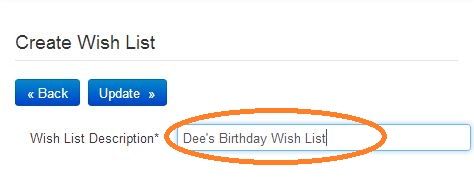
Enter your Wishlist name.
Your Wishlist appears in the list of activities. The tasks button shows a list of all items in your Wishlist. Press the "Tasks" button to add the items you wish for.

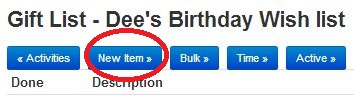
The first time you enter the Wish List, of course there will be no items. Press "New Item" to add a new item.
Enter your wish or a description of your gift;
If you have seen exactly what you want on the Internet then enter a link to the Web Site name in the reference (i.e. go-to the site and cut and paste the link reference beginning with HTTP in the address bar of your browser at the top.
You can always come back and enter this later if you don't want to do it now.
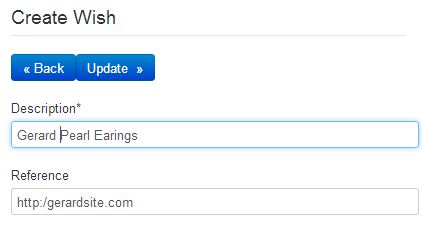
Then simply press the Update button on the screen above to add the item to your list and return to the Wishlist;

Share my Wishlist with others
Once your Wishlist is complete, or whenever, you can add the people you want to share your wishlist with.
I.e. share your Birthday List,Wedding List or Christmas List with others who may wish to consider your items. To do this, press the view button next to your Wish List and select the Teams button.
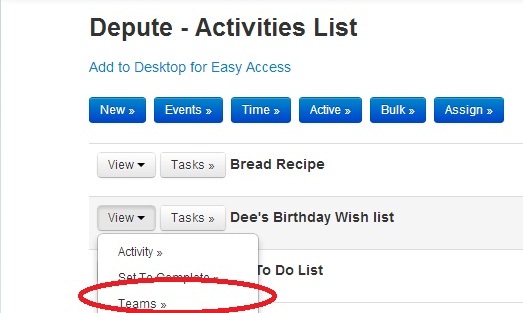
Then press the Members button to add your friends and family to your list.
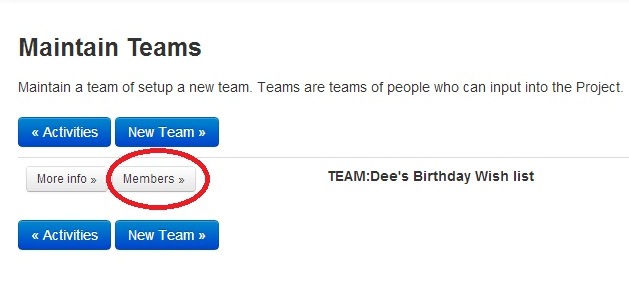
You will see yourself, leave that there, and then add other people by using the "New Member" button.
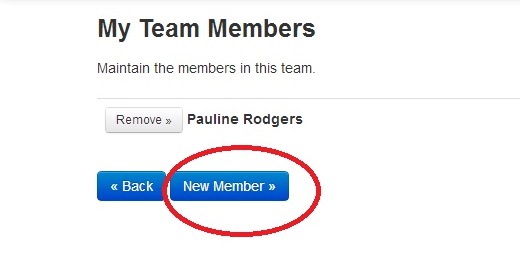
Select the people you want to view the list, then press "Add"
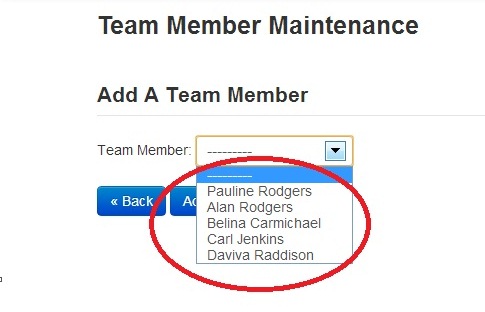
Easy.You now have your Wish List and people can tick off when they have secured the item you wished for.

Goto our home-page, create birthday lists, wedding lists, and any shower list by setting up a wish-list;
If you have not already registered for an account then please click on the login box above to create one.
Be a pioneer and write the first comment.
Note: Current average rating of based on reviews and ratings. (1-Low, 5-High)
Note: Comments and ratings help this site get better; if you see something missing, see something wrong, have a question, or want to suggest something to improve then comment below and join the dialogue;